Split-horizon DNS for an internet-facing ALB: how and why
The problem
An internet-facing Application Load Balancer on AWS publishes only its public IP addresses in DNS. A service in a private subnet that resolves the ALB's hostname gets those public IPs, so its traffic exits the VPC through a NAT gateway only to re-enter via the load balancer's public interface.
This means paying NAT data processing and data transfer fees for every request between two workloads sitting meters apart in the same VPC. At significant internal traffic volumes, the cost ranges from tens to hundreds of euros per month, and scales linearly with traffic.
The traditional solution
A second, internal ALB
The most straightforward solution is to create a second, internal Application Load Balancer in front of the same targets. An internal ALB resolves directly to its own private IPs, so in-VPC traffic never leaves.
The problem: an ALB starts at roughly $16/month before LCUs, and requires creating separate listeners, target groups, and health checks for the second ALB. The targets can be the same, but each target group is bound to a single load balancer, so they must be registered again. Two configurations to keep in sync, double health checks on the targets, and a fixed cost that doesn't scale to zero.
Our solution: a standalone CloudFormation stack
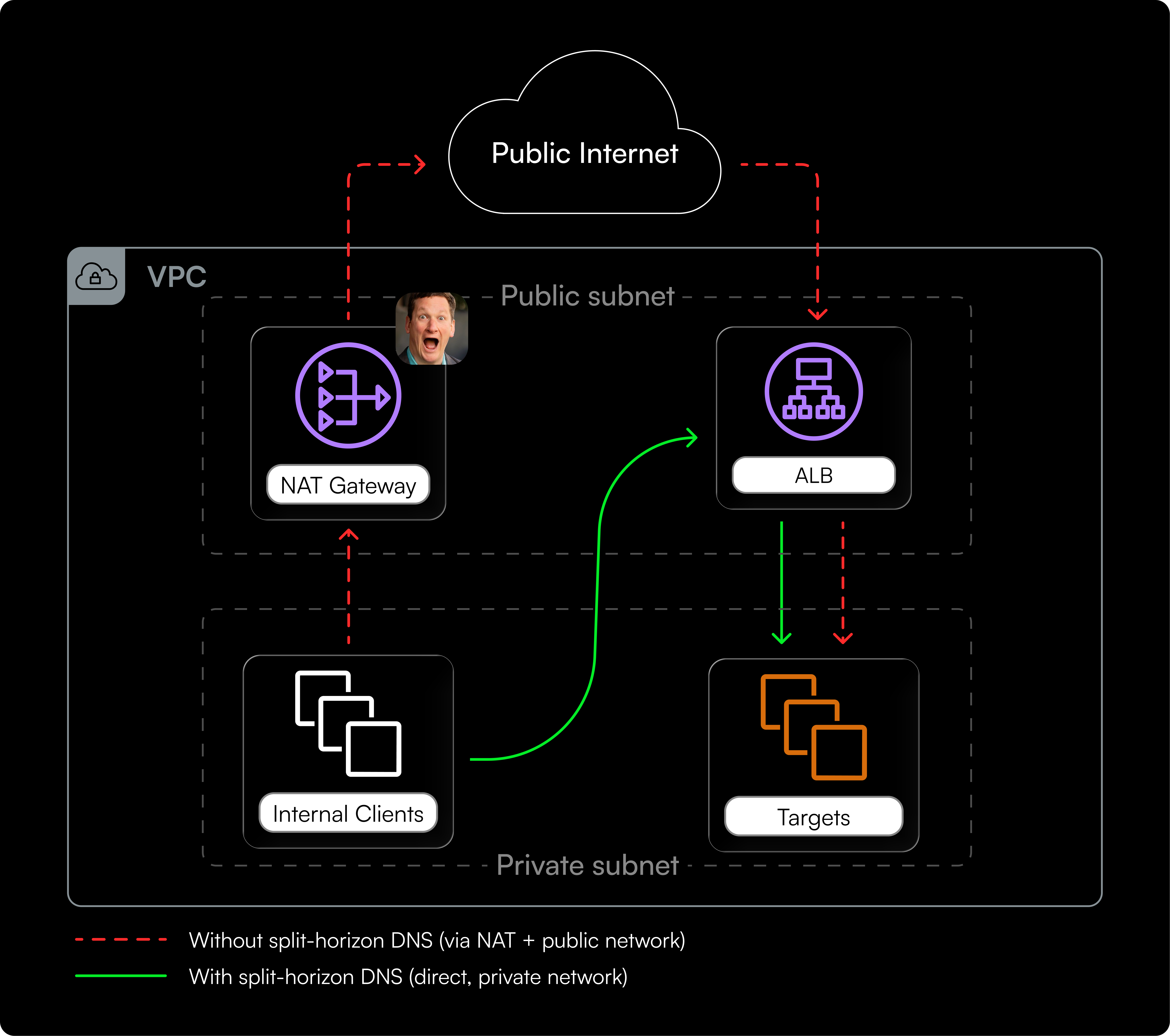
We built a CloudFormation stack that solves the problem with a scheduled Lambda, a private hosted zone, and an automatically maintained A record.
The principle is simple: ALB nodes already have private IPs on their ENIs. These aren't published in DNS and change when the ALB scales, but they're directly reachable from within the VPC. The stack keeps a private A record aligned to those addresses.
This isn't a new pattern: AWS itself implements it natively for other services. An RDS instance with public access enabled automatically resolves to its private IP when the DNS query comes from within the VPC, and to its public IP when it comes from outside. For Application Load Balancers this feature doesn't exist: DNS always returns public IPs regardless of where the query originates. Our stack adds exactly what's missing.
How it works
- Every minute, EventBridge Scheduler invokes a Lambda.
- The Lambda resolves the ALB's public DNS name to get its current public IPs.
- It calls
ec2:DescribeNetworkInterfacesfiltering byassociation.public-ipwith those IPs. This returns the ALB's ENIs: each ENI has both a public IP (the association) and a private IP on the VPC subnet. The Lambda reads the private IPs. - If the A record in the private hosted zone differs from the private IPs just obtained, it updates it with an UPSERT.
The key step is the third: the ALB's ENI private IPs aren't published anywhere, but they're directly reachable from within the VPC. The Lambda discovers them by starting from the public IPs (which are in DNS) and tracing back to the underlying ENIs.
Internal VPC callers resolve the private name and reach the ALB directly on the private network. TLS continues to work because the certificate is on the ALB listener, not on the IP. Nothing about the ALB changes.
Split-horizon DNS setup
Typical setup, with pCustomAlbPrivateDnsName=lb.my-company.com:
public zone   app1.my-company.com  CNAME → lb.my-company.com
              app2.my-company.com  CNAME → lb.my-company.com
              lb.my-company.com    ALIAS → my-alb-123456.eu-west-1.elb.amazonaws.com

private zone  lb.my-company.com    A     → ALB private IPs   (this stack)
Only lb.my-company.com splits between public and private. Adding services costs one public CNAME each, without touching the private zone.
If the public zone isn't on Route 53, a CNAME in place of the ALIAS works the same way.
Why follow DNS instead of ENI events
One might consider reacting to ENI creation/deletion events (via EventBridge) rather than resolving DNS every minute. In practice, the ALB's DNS is the only reliable source of "ready to receive traffic" state. During scale-out, the ENI is created before the node is ready: adding it to the private record would route traffic to a node that isn't responding yet. During scale-in, the deletion event arrives after the node has already been shut down. Following DNS means operating within the same time window in which AWS considers the node active.
Caching
The Lambda keeps the ALB's latest public IPs in memory within the Lambda execution environment. As long as the execution environment stays "warm" and the public IPs haven't changed, the function exits immediately after DNS resolution without calling EC2 or Route 53.
The cache is written only after Route 53 has accepted the update, or after verifying with a read that the record already contains the expected private IPs. A failed run doesn't dirty the cache: on the next attempt the Lambda restarts from the DNS comparison and re-executes the full flow.
The downside: as long as the ALB's public IPs remain unchanged, a warm execution environment assumes the private record is still correct. Manual changes to the record won't necessarily be repaired until a cold start or a change in the ALB's public IPs. The private record should therefore be treated as exclusively managed by this stack.
Advantages over alternatives
| Split-horizon DNS | Internal ALB | |
|---|---|---|
| Monthly cost | ~$0.50 (hosted zone) | ~$16-25 (ALB + LCU) |
| Resources to manage | 1 stack, 0 duplicate configuration | 2 ALBs, listeners, target groups, health checks, DNS |
| NAT traffic eliminated | yes | yes |
| Convergence after scaling | ~2 minutes (no errors) | immediate |
The roughly two-minute convergence (one minute schedule interval + 60 seconds TTL) is the only operational trade-off. In practice, however, no errors occur during scaling: when the ALB removes a node, it first removes it from DNS and keeps it active in a grace period to drain existing connections. Even if the private record still points to the old address, traffic continues to be served until the node actually shuts down. For the vast majority of internal workloads this is not an issue.
Cost breakdown
The stack costs roughly $0.50 per month: the price of a Route 53 private hosted zone. Everything else falls within AWS perpetual free tiers:
| Item | Usage | Free tier | Charged |
|---|---|---|---|
| Route 53 private hosted zone | 1 zone | none | $0.50/month |
| Route 53 queries (private zone) | any volume | n/a — never charged | $0 |
| Lambda invocations | 43,200 | 1,000,000/month | $0 |
| Lambda duration | ≤10,800 GB-s | 400,000 GB-s/month | $0 |
| EventBridge Scheduler | 43,200 | 14,000,000/month | $0 |
| CloudWatch Logs | ~10–25 MB | 5 GB/month | $0 |
| CloudWatch Alarms | 2 | first 10 | $0 |
Lambda duration might seem relevant, but even assuming a full second per run at 256 MB — several times the actual value since most executions exit immediately on the cache check — that's 10,800 GB-s against a free allocation of 400,000 GB-s.
These free tiers are perpetual, not limited to the account's first 12 months. They are per account, not per stack: on an account already using Lambda, Logs, or more than eight alarms, the marginal cost rises to roughly $0.70/month.
Comparison with an internal ALB
The most obvious alternative is a second, internal ALB in front of the same targets. The fixed cost starts at $0.0225/hour, i.e. roughly $16.43/month.
Beyond cost, an internal ALB requires keeping two configurations in sync: listeners, target groups (each target group is bound to a single load balancer), health checks, DNS records in a private hosted zone, and TLS certificates attached to both. Targets receive double the health checks.
The real savings
Without our stack, anyone with internal traffic toward an internet-facing ALB has two choices:
AWS-recommended option: an internal ALB
~$16/month fixed + double configuration to manage (listeners, target groups, health checks, DNS records, certificates). It works, but has an organizational cost on top of the financial one.
Do nothing
Traffic exits the VPC through the NAT gateway and re-enters via the ALB's public interface, paying NAT data processing ($0.045/GB) and regional data transfer for public IP usage ($0.01/GB per direction). At significant internal volumes (tens or hundreds of GB per month between services) this easily exceeds the $16 of an internal ALB.
Our stack eliminates both problems at $0.50/month: traffic stays on the VPC's private network, without a second ALB to manage and without going through NAT. As a bonus, traffic that doesn't leave the VPC also has lower latency compared to the NAT → internet → ALB path.
All prices listed refer to US East (N. Virginia) and vary by region.
Technical details
Architecture
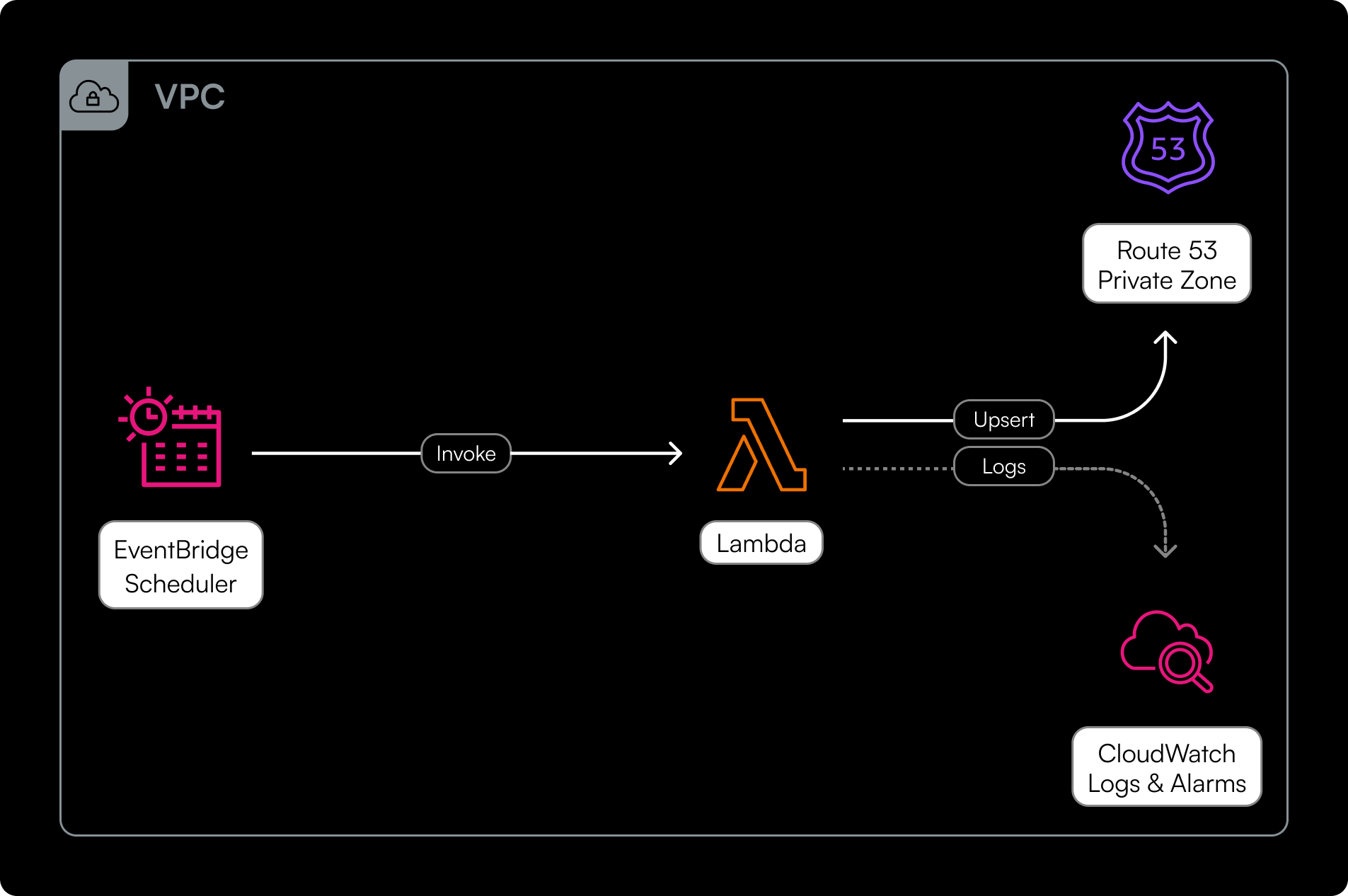
The stack creates 13 resources, all in a single CloudFormation template with no external dependencies:
- A Route 53 private hosted zone associated with the VPC
- A placeholder A record, kept up to date by the Lambda
- The reconciliation Lambda with its IAM role, log group, and scheduler
- A Lambda custom resource for clean teardown
- Two optional CloudWatch alarms (errors and missing invocations)
Teardown and DNS name updates: why they matter and how they work
One aspect to handle is stack deletion and private DNS name changes. Route 53 requires that a record DELETE matches the current values exactly. But CloudFormation only knows the placeholder values it created, while the record contains the real IPs written by the Lambda.
Without intervention, the record delete fails with InvalidChangeBatch and the hosted zone cannot be emptied.
The solution is a custom resource (RestoreSeedRecordInvoke) that restores the placeholder values in two scenarios:
- Stack deletion: during the Delete phase, it restores the seeds before CloudFormation attempts to delete the record.
- Change of
pCustomAlbPrivateDnsName: the hosted zone and record are replaced (update-replace). The custom resource receives an Update event withOldResourcePropertiescontaining the old zone ID and old DNS name, and writes the seed IPs before CloudFormation deletes the old resources.
Creation order
Route 53 is created first because the main Lambda's IAM policy references the hosted zone ID:
The schedule is created last on purpose: nothing invokes the Lambda until both the record and the teardown helper are active. SplitHorizonLambda is created after RestoreSeedRecordInvoke so that deletion happens in reverse order.
Deletion order
CloudFormation deletes in reverse dependency order:
SplitHorizonLambdaNoInvocationAlarm→ deleted before the schedule stops, so the loss of invocations doesn't trigger false alarmsSplitHorizonSchedule→ invocations stopSplitHorizonLambda→ the function is deleted, no new invocations can startRestoreSeedRecordInvoke→ UPSERTs the placeholder values immediatelyPrivateRecordA→ CloudFormation's DELETE now matches the expected valuesPrivateHostedZone→ the zone is empty, deletes without issues
The ordering is guaranteed because SplitHorizonLambda declares DependsOn: RestoreSeedRecordInvoke: CloudFormation creates the function after the custom resource and deletes it before. Once the function no longer exists, no new invocations can start — neither from the internal schedule (already deleted at step 2) nor from an external invoker, which receives ResourceNotFoundException.
The residual race condition
Deleting a Lambda function does not terminate an already-running invocation. An invocation started just before step 2, and for some reason still running at step 4, could UPSERT the real addresses after the restore has put the placeholders back. This would cause the DELETE at step 5 to fail with InvalidChangeBatch.
The gap between step 2 and step 4 is roughly 20 seconds, while a normal run finishes in one or two seconds. A run stuck retrying against EC2 or Route 53 is needed to trigger the race; increasing pLambdaTimeoutSeconds widens the window.
Recovery after a failed delete
Retrying the stack delete alone isn't enough: the custom resource has already been deleted and the restore won't run again. To fix:
- Manually set the A record to the placeholder values (
10.1.2.3,10.4.5.6) - Retry the stack deletion
DNS name updates
When pCustomAlbPrivateDnsName is changed, CloudFormation replaces the hosted zone and record (update-replace). The custom resource receives an Update event with OldResourceProperties containing the old zone ID and old DNS name. The Lambda writes the seed IPs to the old zone, then CloudFormation proceeds to delete it without errors.
The sequence during the update is:
- New
PrivateHostedZoneandPrivateRecordAcreated with the new name RestoreSeedRecordInvokereceives Update → restores seeds on the old zoneSplitHorizonLambdaupdated (env vars now point to the new zone)- CloudFormation enters the cleanup phase: deletes the old custom resource (Delete on the old physical resource) → the Lambda restores the seeds on the old zone again
- Old
PrivateRecordAdeleted (the DELETE matches the expected values) - Old
PrivateHostedZonedeleted
There's a double safety net: since the custom resource itself undergoes an update-replace, CloudFormation generates both an Update (step 2) and a Delete (step 4) on the old resource. Even if the split-horizon Lambda managed to rewrite the real IPs between the two steps, the Delete at step 4 restores the seeds before the actual record deletion.
Once the Lambda is updated (step 3), even if the scheduler invokes it, it writes to the new zone and the old one is no longer touched.
External scheduler
The stack also supports using an external scheduler. A parameter (pEnableSchedule=false) disables the internal schedule without breaking CloudFormation dependencies. Anyone with an existing orchestrator (cron, Step Functions, or other) can invoke the Lambda directly, at any interval.
The Lambda timeout is parameterized: anyone invoking every 30 seconds can lower it to 25 to avoid overlaps.
A note on alarms: if pAlarmSnsTopicArn is configured together with pEnableSchedule=false, the missing-invocations alarm (TreatMissingData: breaching) will fire until the external scheduler starts invoking the Lambda. This is expected behavior: the alarm correctly detects that the function isn't being invoked. If using an external invoker, ensure it's operational within 5 minutes of deploying the stack, or expect a transient notification that clears on its own once invocations begin.
Conclusions
The project is open source, available on GitHub as a single CloudFormation template deployable in any account and region with no external dependencies. The goal is to provide an operational solution to a concrete problem many AWS architectures face, at a negligible cost compared to the traditional solution.
The source code, complete documentation, and deployment instructions are available in the repository.